RIP Routing in GNS3: MikroTik v7, Cisco 7200 & Fortigate
RIP Routing: A Foundational Approach to Dynamic Routing
RIP (Routing Information Protocol) is one of the oldest dynamic routing protocols, and it offers several advantages over static routing. Unlike static routes, which are manually configured and can be hard to maintain, RIP allows for automatic route updates and adjustments as network conditions change.
RIP works by using hop count as its metric to determine the best path. Each hop represents a router the data must pass through. The maximum allowable hop count is 15, Any destination that more than 15 hops is considered unreachable. RIP doesn't take into account the speed or bandwidth of the links; it simply chooses the path with the shortest hops. By default, RIP routers send route updates every 30 seconds. This periodic update ensures that routers have the most current routing information. There are some features that can make your routing safer, reduce the load, and solve problems like loops, etc.
Auto-Summary in RIP
Auto-summary is a feature in RIP that automatically combines smaller subnets into a larger, classful network when advertising routes. This means RIP will send a summarized route (like 192.168.0.0/16) instead of listing every individual subnet (like 192.168.1.0/24 and 192.168.2.0/24). It helps simplify the routing tables, but in modern networks that use subnetting (classless addressing), it can cause problems by incorrectly grouping subnets. In older devices, the auto-summary feature is enabled by default, but you can turn it off.
Authentication in RIP: Password vs. Keychain Methods
RIP offers two ways to secure routing updates: password-based authentication and keychain-based authentication. Both methods can use plaintext (text) passwords or MD5 encryption, depending on how secure you want the connection to be.
- Password-Based Authentication (Text or MD5) In password-based authentication, RIP updates are sent with a shared password. This password can either be in plaintext (simple text) or MD5 encrypted (more secure).
- Keychain-Based Authentication (MD5) is similar to MD5 authentication but more flexible and secure. Instead of just using a single password, a keychain (a list of keys) is used to authenticate the RIP updates. This is especially useful for key rotation, allowing the keys to be changed because support pre-scheduled key rotation .
Multicast Updates in RIP: Efficient Routing Information Sharing
Multicast updates in RIP allow routers to share routing information more efficiently. Instead of broadcasting updates to all devices in the network, RIP uses a multicast address (224.0.0.9) to send updates only to routers that need them. Multicast updates are used in RIP v2 (RIP version 2) by default. If needed, the commands are :
RIP Timers: Update, Invalid, Hold Down,and Flush
- Update Timer or update-interval in (mikrotik)
Determines how often the router sends routing updates to its neighbors; default value is 30 seconds. - Invalid Timer or route-timeout in (mikrotik)If a route doesn’t get an update in this time, it’s marked invalid; default value is 180 seconds.
- Hold Down Timer Prevents accepting new routes for a route marked invalid; default value is 180 seconds.
- Flush Timer or route-gc-timeout in (mikrotik)Defines how long an invalid route stays in the table before being removed; default value is 240 seconds.
Split Horizon and Poison Reverse in RIP
- Split Horizon is a mechanism used to prevent routing loops. It works by preventing a router from sending updates back to the same interface from which it received the information. This ensures that routing updates don't get routed in circles, improving the stability of the network.
- Poison Reverse is an extension of Split Horizon. When a router learns that a route is no longer valid (for example, the destination is unreachable), it will advertise the route with an infinite metric (16) back to the source, effectively "poisoning" the route. This tells other routers that the route is unavailable and helps prevent loops.
Redistribute in RIP
Redistribute allows you to import routing information from other routing protocols (e.g., OSPF, EIGRP, STATIC, etc) into RIP. This is useful for sharing routes between different routing protocols running on the same network.
Here's the video where I configured RIP routing with passive interfaces and internet acces.
1. FortiGate CLI (RIP)
To configure RIP on a FortiGate device using CLI, follow these steps:
2. Cisco 7200 CLI (RIP)
To configure RIP on a Cisco 7200 router using CLI, follow these steps:
3. MikroTik v7 CLI (RIP)
To configure RIP on MikroTik v7 using CLI, follow these steps:
if you set RIP (edit config) it can cause ip loop, to fix this you need to restart the routers.
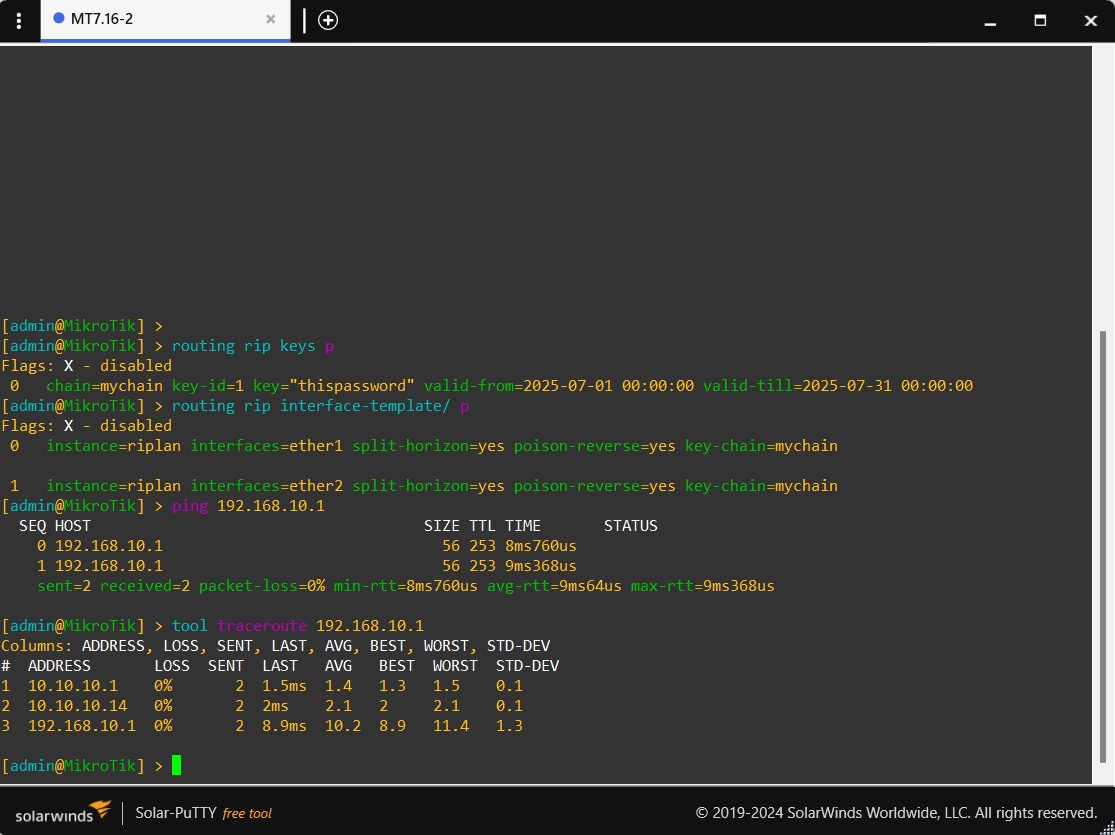
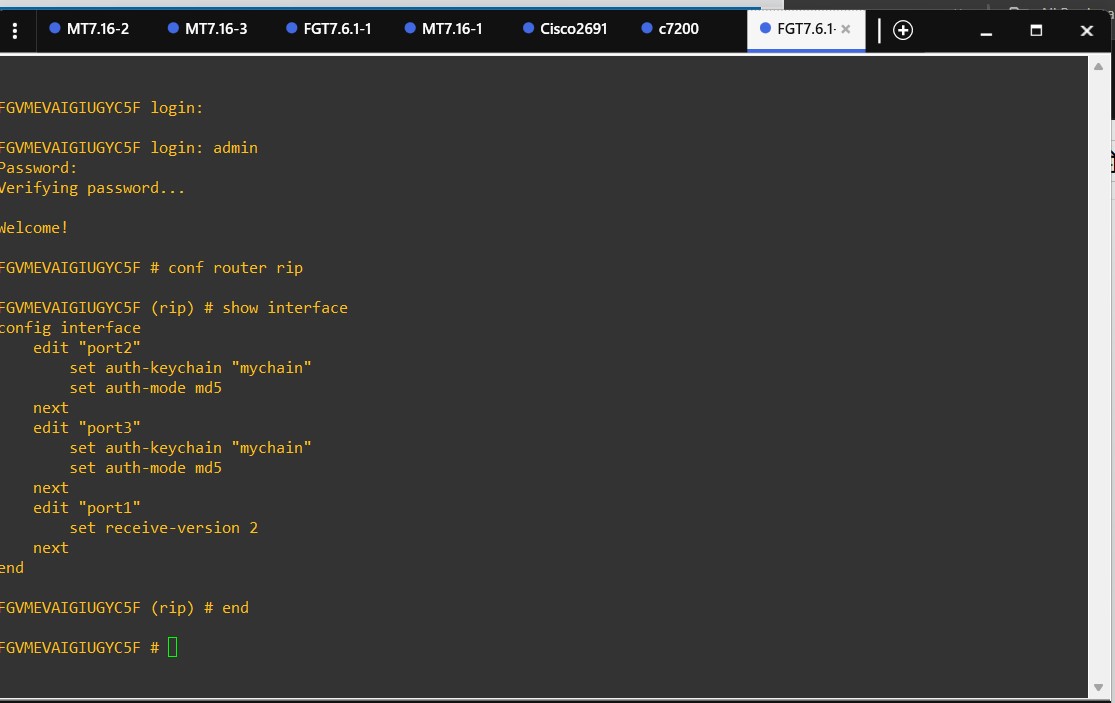
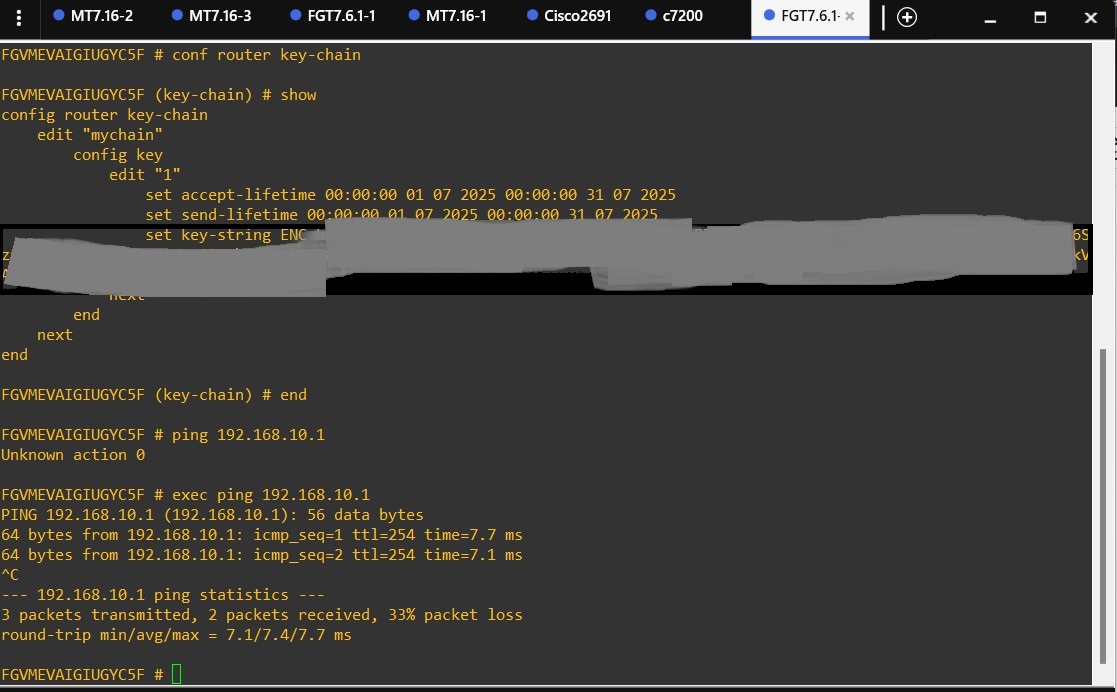
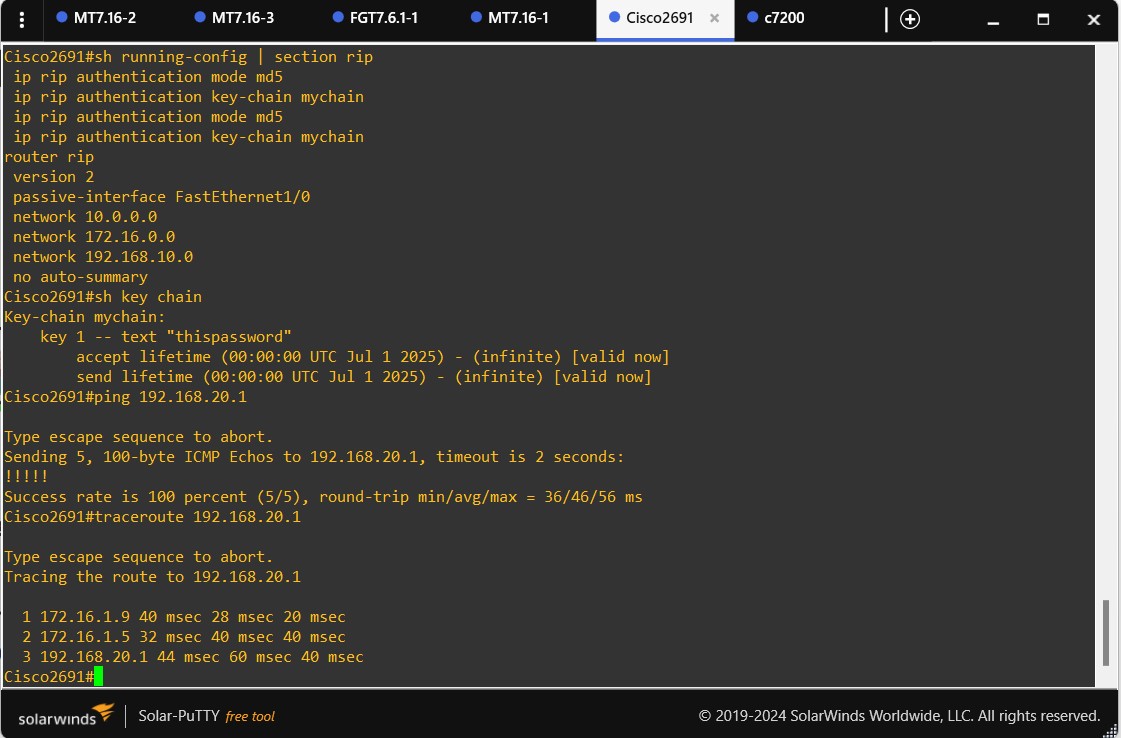
Considering that most features are configured through parameters within the main RIP instance menu, I won't include all commands here. However, since key chain-style authentication uses a different field, I'll include its configuration separately—both as a reference for you and a reminder for myself.
Note: When configuring key chains, make sure that the clocks on all devices are synchronized—either manually or using NTP.
1. FortiGate CLI (RIP)
keychain not available in GUI
2. Cisco 7200 CLI (RIP)
3. MikroTik v7 CLI (RIP)